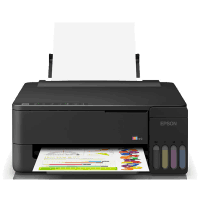
Epson ET-1910 Printer Manual
 | PDF manual |  | 167 pages |  | English |
Brief summary:
- This printer series is designed for high-volume printing with an integrated ink tank system, ideal for home and office use
- It supports printing only, with no scanning or copying functions in this model line
- The printer uses refillable ink bottles instead of cartridges, reducing cost per page and increasing efficiency
- Only genuine Epson ink bottles are recommended to prevent damage and maintain warranty coverage
- The printer supports USB and Wi-Fi network connectivity, allowing printing from computers and mobile devices
- It is compatible with Epson Smart Panel, AirPrint, and cloud printing services for remote access
- Users can print on multiple media types including:
- Plain paper
- Photo paper
- Matte paper
- Envelopes
- Large paper formats
- Advanced print features include:
- Poster printing
- Zoom and scaling
- Header and footer printing
- Anti-copy patterns
- Borderless printing
- Proper setup requires:
- Initial ink charging
- Correct paper loading
- Installing official Epson drivers
- Network configuration if using wireless printing
- The control panel includes status lights that indicate:
- Wi-Fi errors
- Paper feed issues
- Paper jams
- Maintenance box status
- Firmware recovery mode
- Regular maintenance is required for best performance:
- Nozzle checks
- Print head cleaning
- Ink level monitoring
- Maintenance box replacement
- The printer has a user-replaceable maintenance box, which stores excess ink from cleaning cycles
- Firmware updates can be performed via USB if recovery mode is activated after an update failure
- Safe operation requires:
- Using the supplied power cable only
- Avoiding ink contact with skin or eyes
- Keeping ink away from children
- Using grounded outlets when available
Frequently Asked Questions (FAQ) — Common User Problems
Q: My printer is not printing. What should I check
- Confirm the printer is powered on
- Check that paper is loaded properly
- Verify ink levels
- Make sure the Epson driver is installed
- Restart the printer and computer
Q: The printer says paper jam, but I removed the paper
- Turn the printer off and on
- Check inside for hidden paper fragments
- Reload paper and retry the print job
Q: The print quality is poor or has missing lines
- Run a nozzle check
- Clean the print head
- Perform power cleaning if needed
- Use genuine Epson ink
Q: The printer cannot connect to Wi-Fi
- Print a network connection report
- Check router settings
- Reconnect the printer to the network
- Use Epson Printer Connection Checker if available
Q: The printer does not respond via USB
- Check if the cable is securely connected
- Try another USB port
- Avoid faulty USB hubs
- Replace the cable if necessary
Q: The maintenance box warning is on
- The box is near full or full
- Replace it to continue cleaning or printing normally
- Ensure it is installed correctly
Q: All lights are flashing
- A printer error may have occurred
- Remove any jammed paper
- Restart the printer
- If the issue continues, service may be required
Q: Firmware update failed and printer entered recovery mode
- Connect the printer via USB
- Download the latest firmware
- Retry the update manually
Q: Mobile printing does not work
- Make sure the printer and mobile device are on the same Wi-Fi network
- Install Epson Smart Panel
- Check AirPrint or cloud print settings
Q: Ink leaked during refill
- Do not squeeze or shake the bottle aggressively
- Clean spills immediately
- Follow refill instructions carefully