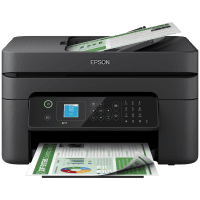
Epson WF-2110W Printer Manual
 | PDF manual |  | 145 pages |  | English |
Brief summary:
-
Compact inkjet printer designed for home and small office use.
-
Print-only model focused on documents and basic color printing.
-
Supports Wi-Fi and USB connections for flexible setup.
-
Compatible with Epson Smart Panel for mobile setup and printing.
-
Works with Epson ink cartridges; correct installation is required.
-
Rear paper feed supports plain paper and envelopes.
-
Mobile printing supported through AirPrint, Mopria and Epson Connect.
-
Printer status and errors shown through LED indicators.
-
Regular maintenance includes nozzle check and print-head cleaning.
-
Built-in troubleshooting for paper feed, ink and connectivity issues.
Common User Problems & Solutions
The printer does not print
Check power, Wi-Fi or USB connection, and ensure the printer is selected as default. Restart the printer and computer.
Poor print quality or faded colors
Run a nozzle check and print-head cleaning. Make sure genuine Epson ink is installed.
Paper jam
Turn off the printer, gently remove jammed paper from the rear feeder and output slot, then reload paper correctly.
Paper does not feed
Fan the paper, adjust the paper guides, do not overload the feeder, and avoid curled or damp paper.
Wi-Fi connection problems
Restart the router and printer, move the printer closer to the router, and reconnect using setup mode.
Printer is offline
Set the printer as default, clear pending print jobs, and verify network connection.
Ink cartridge not recognized
Remove and reinstall the cartridge firmly. Use compatible Epson cartridges only.
LED lights blinking
Check the printer manual indicators; blinking lights usually indicate paper, ink, or connection issues.
Slow printing
Select draft or standard quality mode and close unnecessary background applications.
Mobile printing not working
Ensure the mobile device and printer are on the same network or use Wi-Fi Direct.